事業グロース
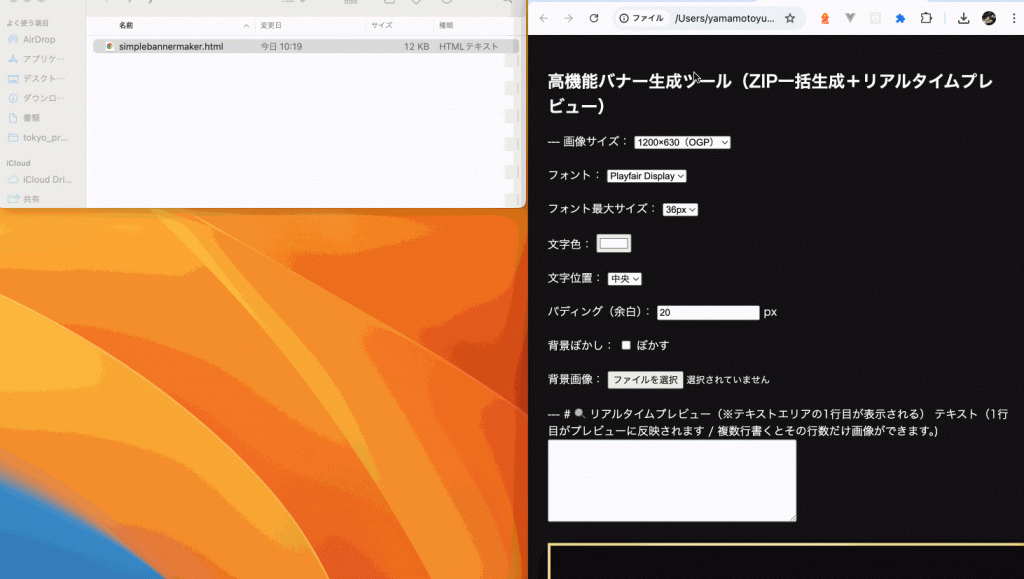
以下のコードをブラウザでsimplebannermaker.htmlで保存してください
<!DOCTYPE html>
<html lang="ja">
<head>
<meta charset="UTF-8">
<title>高機能バナー生成ツール(完全版・ぼかし対応)</title>

<!-- html2canvas -->
<script src="https://cdnjs.cloudflare.com/ajax/libs/html2canvas/1.4.1/html2canvas.min.js"></script>

<!-- JSZip & FileSaver -->
<script src="https://cdnjs.cloudflare.com/ajax/libs/jszip/3.7.1/jszip.min.js"></script>
<script src="https://cdnjs.cloudflare.com/ajax/libs/FileSaver.js/2.0.5/FileSaver.min.js"></script>

<!-- Google Fonts -->
<link href="https://fonts.googleapis.com/css2?family=Playfair+Display:wght@700&family=Noto+Sans+JP:wght@700&family=Roboto:wght@700&display=swap" rel="stylesheet">

<style>
    body {
        background:#111;
        color:#fff;
        padding:20px;
        font-family:sans-serif;
    }

    .generated-block,
    #preview-block {
        position: relative;
        display: flex;
        justify-content: center;
        align-items: center;

        overflow: hidden;
        background-size: cover;
        background-position: center;
        border-radius: 14px;

        /* 高級枠:border-image は避けて box-shadow で表現 */
        box-shadow: 0 0 0 4px rgba(212,175,55,0.9), 0 0 20px rgba(0,0,0,0.5);
    }

    .overlay {
        position:absolute;
        inset:0;
        background: rgba(0,0,0,0.35);
        z-index:1;
    }

    .text {
        position:relative;
        z-index:2;
        white-space:pre-line;
        line-height:1.3;
        text-align:center;
    }

    #preview-bg {
        position:absolute;
        inset:0;
        background-size:cover;
        background-position:center;
        z-index:0;
    }
</style>
</head>
<body>

<h2>高機能バナー生成ツール(完全版・ぼかしも一致)</h2>

<hr style="margin:20px 0; opacity:0.5;">

<!-- 設定 UI -->

画像サイズ:
<select id="sizeSelect" onchange="updatePreview()">
  <option value="1200x630">1200×630(OGP)</option>
  <option value="300x250">300×250</option>
  <option value="250x150">250×150</option>
</select><br><br>

フォント:
<select id="fontSelect" onchange="updatePreview()">
  <option value="'Playfair Display', serif">Playfair Display</option>
  <option value="'Noto Sans JP', sans-serif">Noto Sans JP</option>
  <option value="'Roboto', sans-serif">Roboto</option>
</select><br><br>

フォント最大サイズ:
<select id="fontSizeSelect" onchange="updatePreview()">
  <option value="28">28px</option>
  <option value="36" selected>36px</option>
  <option value="48">48px</option>
  <option value="60">60px</option>
</select><br><br>

文字色:
<input type="color" id="fontColor" value="#ffffff" onchange="updatePreview()"><br><br>

文字位置(横):
<select id="textAlignX" onchange="updatePreview()">
  <option value="center">中央</option>
  <option value="left">左</option>
  <option value="right">右</option>
</select><br><br>

パディング:
<input type="number" id="paddingInput" value="20" onchange="updatePreview()"> px<br><br>

背景ぼかし:
<input type="checkbox" id="blurCheck" onchange="onBlurToggle()"> ぼかす<br><br>

背景画像:
<input type="file" id="imageInput" accept="image/*"><br><br>

<hr style="margin:20px 0; opacity:0.5;">

# 🔍 リアルタイムプレビュー(テキスト1行目が対象)

<textarea id="textInput" rows="6" cols="50" oninput="updatePreview()"></textarea>

<br><br>

<div id="preview-block" class="generated-block" style="width:1200px; height:630px;">
    <div id="preview-bg"></div>
    <div class="overlay"></div>
    <div id="preview-text" class="text">プレビュー</div>
</div>

<hr style="margin:20px 0; opacity:0.5;">

# 🖼 ZIP まとめて画像生成
<button onclick="generateAll()">ZIP ダウンロード</button>


<script>
let uploadedImage = "";     // 元画像の dataURL
let blurredImage  = null;   // ぼかし済み dataURL(生成済みなら再利用)
let isBlurring    = false;  // ぼかし生成中フラグ

/*========================================
  背景画像読み込み
========================================*/
document.getElementById("imageInput").addEventListener("change", function(e){
  const reader = new FileReader();
  reader.onload = function(event){
    uploadedImage = event.target.result;
    blurredImage = null;      // 新しい画像を読み込んだらぼかしをリセット
    updatePreview();
  };
  reader.readAsDataURL(e.target.files[0]);
});

/*========================================
  元画像 → ぼかし画像(canvas)に変換
========================================*/
function createBlurredImage(srcDataURL, blurPx) {
    return new Promise((resolve, reject) => {
        if (!srcDataURL) {
            resolve(null);
            return;
        }
        const img = new Image();
        img.onload = () => {
            const canvas = document.createElement("canvas");
            canvas.width = img.width;
            canvas.height = img.height;
            const ctx = canvas.getContext("2d");
            ctx.filter = `blur(${blurPx}px)`;
            ctx.drawImage(img, 0, 0);
            try {
                const url = canvas.toDataURL("image/png");
                resolve(url);
            } catch (e) {
                reject(e);
            }
        };
        img.onerror = reject;
        img.src = srcDataURL;
    });
}

/* ぼかしチェックボックス変更時 */
async function onBlurToggle() {
    const blur = document.getElementById("blurCheck").checked;
    if (blur && uploadedImage && !blurredImage && !isBlurring) {
        // 初回だけぼかし画像を生成
        try {
            isBlurring = true;
            blurredImage = await createBlurredImage(uploadedImage, 8);
        } catch (e) {
            console.error("ぼかし生成エラー:", e);
        } finally {
            isBlurring = false;
        }
    }
    updatePreview();
}


/*========================================
  自動フォントサイズ調整
========================================*/
function autoResizeFont(element, maxSize) {
    let size = maxSize;
    element.style.fontSize = size + "px";

    while (
      element.scrollHeight > element.parentElement.clientHeight - 40 ||
      element.scrollWidth > element.parentElement.clientWidth - 40
    ) {
        size -= 2;
        if (size < 12) break;
        element.style.fontSize = size + "px";
    }
}


/*========================================
  プレビュー更新
========================================*/
function updatePreview() {

    const textFirstLine = document.getElementById("textInput").value.split("\n")[0] || "";

    const size = document.getElementById("sizeSelect").value;
    const [w, h] = size.split("x").map(Number);

    const font   = document.getElementById("fontSelect").value;
    const maxFont= parseInt(document.getElementById("fontSizeSelect").value);
    const color  = document.getElementById("fontColor").value;
    const pad    = parseInt(document.getElementById("paddingInput").value);
    const posX   = document.getElementById("textAlignX").value;
    const blur   = document.getElementById("blurCheck").checked;

    const block  = document.getElementById("preview-block");
    const bgElm  = document.getElementById("preview-bg");
    const textElm= document.getElementById("preview-text");

    block.style.width  = w + "px";
    block.style.height = h + "px";
    block.style.padding= pad + "px";

    // 縦方向は常に中央
    block.style.alignItems = "center";

    // 横方向のみ制御
    block.style.justifyContent =
        posX === "left" ? "flex-start" :
        posX === "right" ? "flex-end" : "center";

    // 背景画像:ぼかしONなら blurredImage / なければ元画像
    let bgUrl = uploadedImage;
    if (blur && blurredImage) {
        bgUrl = blurredImage;
    }

    if (bgUrl) {
        bgElm.style.backgroundImage = `url(${bgUrl})`;
    }

    // テキスト
    textElm.innerText = textFirstLine;
    textElm.style.fontFamily = font;
    textElm.style.color = color;

    autoResizeFont(textElm, maxFont);
}


/*========================================
  ZIP まとめて生成
========================================*/
async function generateAll() {

    if (!uploadedImage) {
        alert("背景画像を選択してください");
        return;
    }

    const lines = document.getElementById("textInput").value
        .split("\n")
        .filter(t => t.trim() !== "");

    if (lines.length === 0) {
        alert("テキスト行がありません");
        return;
    }

    const size   = document.getElementById("sizeSelect").value;
    const [w, h] = size.split("x").map(Number);

    const font   = document.getElementById("fontSelect").value;
    const maxFont= parseInt(document.getElementById("fontSizeSelect").value);
    const color  = document.getElementById("fontColor").value;
    const pad    = parseInt(document.getElementById("paddingInput").value);
    const posX   = document.getElementById("textAlignX").value;
    const blur   = document.getElementById("blurCheck").checked;

    // ぼかしONなら書き出し前に blurredImage を用意
    if (blur && uploadedImage && !blurredImage) {
        try {
            blurredImage = await createBlurredImage(uploadedImage, 8);
        } catch (e) {
            console.error("書き出し用ぼかし生成エラー:", e);
        }
    }

    const bgSource = blur && blurredImage ? blurredImage : uploadedImage;

    const zip = new JSZip();
    const folder = zip.folder("banners");

    // 一時レンダリング用 DOM(画面外)
    const tempArea = document.createElement("div");
    tempArea.style.position = "absolute";
    tempArea.style.top = "-9999px";
    tempArea.style.left = "-9999px";
    document.body.appendChild(tempArea);

    for (let i = 0; i < lines.length; i++) {

        const block = document.createElement("div");
        block.className = "generated-block";
        block.style.width = w + "px";
        block.style.height= h + "px";
        block.style.padding= pad + "px";
        block.style.position= "relative";
        block.style.display = "flex";
        block.style.alignItems = "center";

        block.style.justifyContent =
            posX === "left" ? "flex-start" :
            posX === "right" ? "flex-end" : "center";

        // 背景
        const bg = document.createElement("div");
        bg.style.position = "absolute";
        bg.style.inset = "0";
        bg.style.backgroundImage = `url(${bgSource})`;
        bg.style.backgroundSize  = "cover";
        bg.style.backgroundPosition = "center";
        bg.style.zIndex = 0;

        // 黒オーバーレイ
        const overlay = document.createElement("div");
        overlay.style.position  = "absolute";
        overlay.style.inset     = "0";
        overlay.style.background= "rgba(0,0,0,0.35)";
        overlay.style.zIndex    = 1;

        // テキスト
        const textDiv = document.createElement("div");
        textDiv.className = "text";
        textDiv.innerText = lines[i];
        textDiv.style.fontFamily = font;
        textDiv.style.color      = color;
        textDiv.style.zIndex     = 2;

        block.appendChild(bg);
        block.appendChild(overlay);
        block.appendChild(textDiv);

        tempArea.appendChild(block);

        autoResizeFont(textDiv, maxFont);

        // レイアウト確定待ち
        await new Promise(r => setTimeout(r, 50));

        try {
            const canvas = await html2canvas(block, {
                backgroundColor: null,
                scale: 2,
                useCORS: true
            });

            const dataURL = canvas.toDataURL("image/png");
            folder.file(`banner_${i + 1}.png`, dataURL.split(",")[1], {base64: true});

        } catch (e) {
            console.error("[ERROR canvas]", e);
        }

        tempArea.removeChild(block);
    }

    document.body.removeChild(tempArea);

    const content = await zip.generateAsync({
        type:"blob",
        compression:"DEFLATE",
        compressionOptions:{ level:6 }
    });

    saveAs(content, "banners.zip");
}
</script>

</body>
</html>
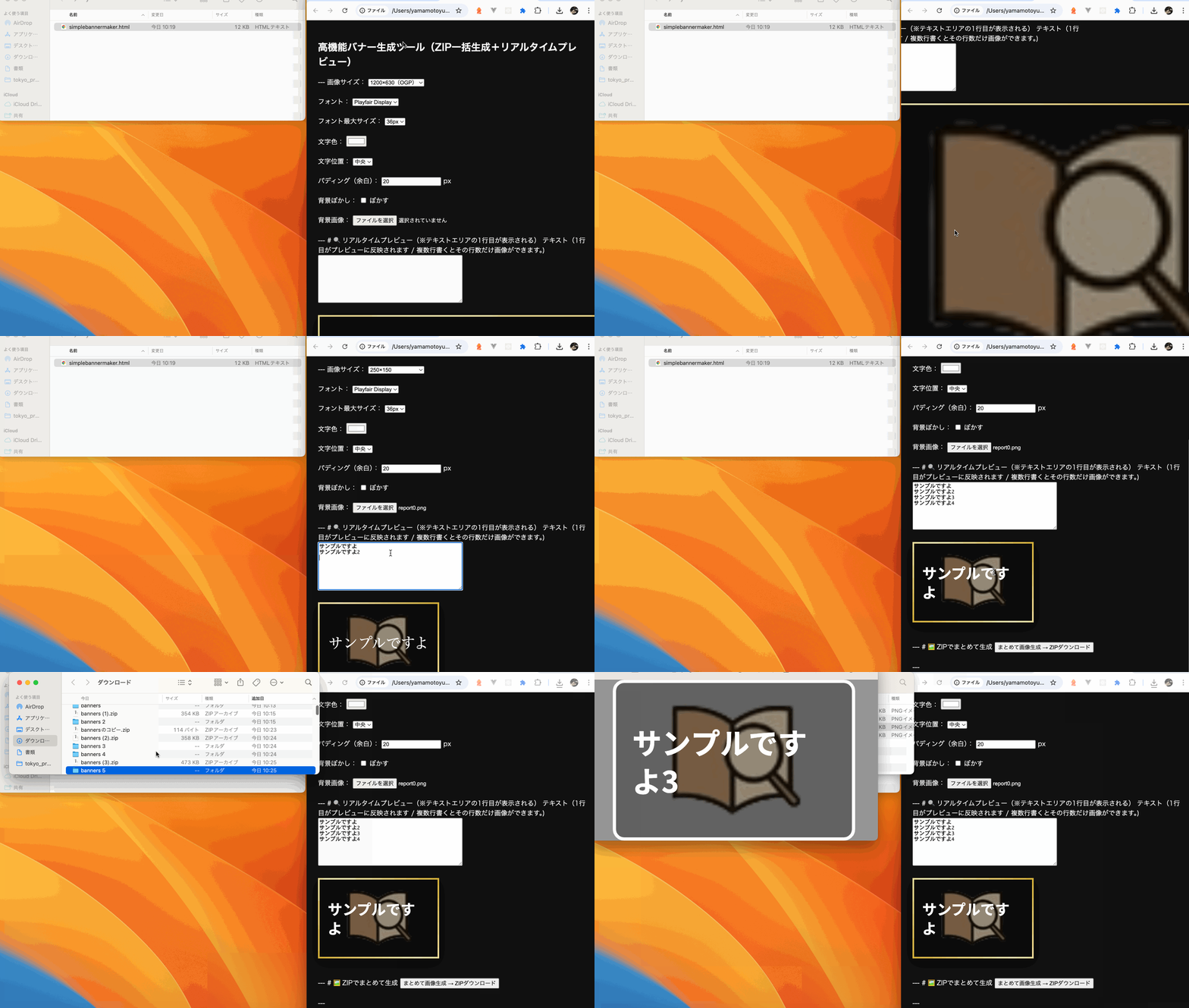
そうするとこうなります。